I’ve designed the view details registration journey to be as direct and open as possible, because I know that the moment you decide to play, you want to move from curiosity to action without delay. The sign‑up process is the doorway to everything I offer — live dealer tables, pokies, table games, and tailored promotions — so I consider it as the first real interaction you have with my platform. In this article, I’ll guide you through each stage in detail: eligibility checks, the exact data fields you’ll fill in, the identity verification steps that follow, how I safeguard your account with modern security layers, and what to do if something doesn’t go as planned. By the end, you’ll know exactly what to look forward to and how to complete registration in one smooth session.
Typical Sign‑Up Difficulties and How I Fix Them
Even with a streamlined flow, real‑world snags arise. The most typical issue I encounter is an email verification link that never arrives. This typically happens because the email provider has routed it to the spam or promotions folder, or because the player entered incorrectly their address during registration. I’ve added a “Resend Verification Email” button on the login page and inside the account dashboard, and I limit resend requests to once every 60 seconds to stop abuse. If the problem persists, my support team can manually verify your email after confirming your identity through an other channel, such as an SMS code sent to the phone number on file.
Another common hurdle is a document rejection during KYC. don’t miss this The most common reasons are:
- Address document older 90 days — bank statements and utility bills have to be recent.
- ID image cropped or edges missing — the system needs to see all four corners of the document.
- Name mismatch — your registered name doesn’t match the name on the ID, often because of a omitted middle name or a maiden name retained.
- Unsupported document type — I cannot accept mobile phone bills, insurance documents, or handwritten letters as proof of address.
- Poor image quality — glare, shadows, or low resolution cause text unreadable.
Occasionally, a player will cause a duplicate account flag. This happens when your name, date of birth, and address closely match an existing record. If you’ve never registered before, it’s usually a data collision — perhaps a family member with the same surname and address already has an account. I’ll require you to validate your identity via a quick manual check, and once distinctness is established, the flag is cleared. If you truly forgot you had an old account, I can help you recover it instead of creating a new one, which keeps you compliant with the one‑account policy.
Restoring a Misplaced Password or Username
If you lose your password, the recovery flow is built to get you back in quickly while stopping an attacker out. On the login page, click “Forgot Password?” and enter the email address associated to your account. I’ll send a unique reset link that becomes invalid after 15 minutes. When you click it, you’ll be directed to a secure page where you can create a new password that meets my strength requirements. You cannot reuse any of your last five passwords, a policy that stops credential cycling. If you don’t receive the email within two minutes, check your spam folder and ensure you’re checking the exact email address you registered with — a common mistake is using a different email alias.
Misplacing access to your username is rarer, but it happens. If you registered with a custom username and can’t retrieve it, use the “Forgot Username?” link. I’ll ask for the email address and your date of birth to verify your identity. If the details match, I’ll display a masked version of your username (for example, j***[email protected]) and deliver the full username to your email. I never reveal account details over live chat or phone without finishing a full identity challenge first. For players who have lost access to both their password and their registered email, I offer a manual account recovery process that demands a video call and submission of the same KYC documents used at sign‑up — a thorough but necessary safeguard.
Creating Your Sign-In Details and Multi‑Factor Security
During the last step of sign‑up, you’ll set up the credentials that guard your account. I demand a strong password: at least eight characters, with a combination of uppercase and lowercase letters, at least one number, and one special character. The strength meter will assist you, changing from red to green as your password improves. Avoid common phrases, sequential numbers, or personal dates — a password manager can help produce and save a truly random string. Your username is either your email address or a unique alias you select, based on the option I present. I advise using your email for simplicity, because it’s the one piece of information you’re most unlikely to forget.
Right after setting your password, I’ll ask you to enable two‑factor authentication (2FA). I present two methods: an authenticator app like Google Authenticator or Authy, and SMS one‑time codes sent to your verified mobile number. I highly recommend the authenticator app route because it isn’t exposed to SIM‑swap attacks. Once enabled, you’ll need to input a time‑based code from your app every time you sign in from a new device or after clearing your browser cookies. You can designate a personal device as trusted for 30 days, which lessens friction without sacrificing security. 2FA is optional at registration, but I will mandate it for certain high‑value withdrawals as an additional safeguard.
Validating Your Identity: The KYC Procedure
Files You’ll Be Required to Submit
Know Your Customer verification is compulsory, and I’ve rendered it as simple as possible by advising you exactly what to upload. You’ll must have one valid government‑issued photo ID — a New Zealand passport, a driver’s licence, or a Kiwi Access Card (formerly 18+ card) all work. The document must be up‑to‑date; I cannot accept expired IDs. The second required document is a recent proof of address, usually a utility bill (electricity, water, gas, or landline), a bank statement, or a council rates notice provided within the last three months. The document must display your full name, current residential address, and the date of issue plainly.
I also retain the right to request a selfie with your ID as an additional liveness check. This step helps me prevent identity theft and synthetic fraud. When prompted, you’ll use your device’s camera to snap a photo of yourself holding the ID document next to your face, with the photo and your features distinctly visible. The system contrasts the selfie with the portrait on your ID using biometric matching. If the match fails due to poor lighting or angle, you can retake it. The entire document upload interface supports JPEG, PNG, and PDF files up to 10 MB each, and I watermark uploaded files with a timestamp for audit integrity.
The Timeframe Verification Needs and What’s Ahead
Once you provide your documents, my automated verification engine initiates processing them immediately. In roughly 70% of cases, the system validates the documents within 10 minutes, and you’ll receive an email notifying your account is fully verified. If the automated check identifies a discrepancy — such as a blurry image, a mismatched address, or a name that doesn’t align perfectly — the file is directed to a manual review queue. During business hours, a compliance specialist typically checks and clears these within four to six hours. Outside of peak times, it may take up to 24 hours. I send status updates via email at each stage so you’re never left guessing.
While verification is pending, you can still access and explore the game lobby in demo mode, but you won’t be able to fund, claim bonuses, or withdraw. This restriction is a regulatory requirement, not a punitive measure. If your documents are rejected, the email will specify the exact reason — for example, “address document older than 90 days” or “ID image cropped” — and you can re‑upload corrected files immediately. I never lock your account due to a single failed attempt. The key to a fast verification is submitting clean, well‑lit photos where all four corners of the document are visible and no information is obscured.
Step‑by‑Step Registration at Legiano Casino
Filling In Your Essential Personal Details
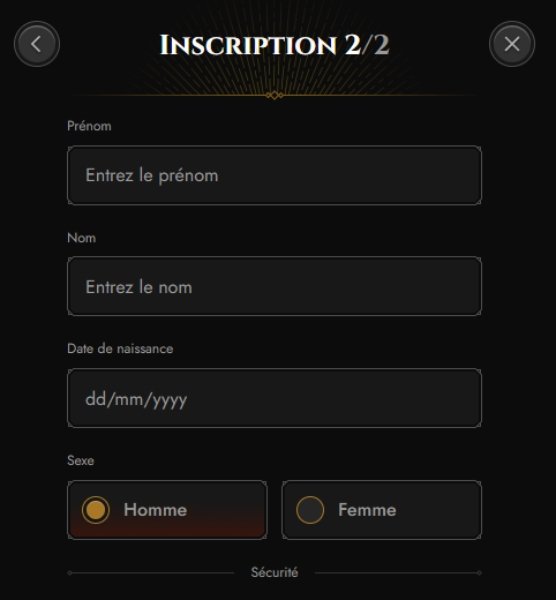
The first screen you’ll see asks for your full first and last name exactly as they appear on your government‑issued ID. I cannot emphasize this enough: shortened names, short forms, or anglicised spellings will lead to a mismatch at document verification and will hold up your account approval. Just under the name fields, you’ll provide your date of birth using a calendar picker that blocks accidental future dates. Then comes your email address, which becomes your primary login identifier and the channel for all critical communications — withdrawal confirmations, security alerts, and bonus notifications. I verify twice your email to ensure it’s valid and belongs to you.
After the email, you input a New Zealand mobile number. I use this number for SMS‑based two‑factor authentication when you enable that option later, and for immediate account‑related notifications. The form automatically formats the number with the +64 country code so you needn’t guess. Finally, you’ll type your residential address, including suburb, city, and postcode. I validate the address against a postal database to ensure it’s a real location, which helps me meet anti‑money laundering obligations. All these fields are required, and I secure them in transit and at rest from the moment you click “Next”.
Choosing Account Preferences and Currency
Once your identity details are in place, you’ll move to a preferences panel. Here you choose your display currency; for New Zealand players, I preset to NZD, but you can pick from several other supported currencies if you prefer. Be mindful with this choice — once you make your first deposit, the currency is locked to prevent exchange‑rate gaming, and changing it later requires a manual review by my support team. You’ll also set your preferred language for the platform interface and communications. I currently provide English, and depending on your region, additional options may appear.
This step also includes responsible gaming limit settings that you can configure right away. You’re not forced to set deposit, loss, or session limits during registration, but I display the options prominently because I believe proactive control is part of a healthy playing experience. You can choose a daily, weekly, or monthly deposit cap, and you can adjust it later from your account dashboard with a cooling‑off period applied to increases. Setting limits early doesn’t lock you out of promotions; it simply gives you a safety net that operates in the background. Once you confirm your preferences, you’ll create your login credentials, which I cover in a dedicated section below.
The reason a Simplified Sign‑Up Process Counts for Aotearoa Players
While I created the registration flow at Legiano Casino, I prioritised speed without neglecting compliance. NZ players often access casino services on mobile devices during a journey or a lunch break, and a lengthy, confusing form can turn enthusiasm into frustration. I’ve cut unnecessary fields and grouped related information so the whole process feels logical. You won’t encounter hidden steps or surprise document requests after you assume you’re done; I present verification requirements early so you can plan. This approach respects your time and reflects the way Kiwis deal with digital services — looking for clarity, instant feedback, and a secure environment from the first tap.
A efficient sign‑up also minimises errors. If a form is cluttered with optional fields or ambiguous labels, players often misenter details, which later leads to verification delays. I’ve employed clear inline validation that checks your email format, password strength, and phone number structure in real time. If something doesn’t match, you’ll see a gentle prompt immediately, not after submission. This attention to detail leads to fewer support tickets and a faster path to your first deposit. For me, a smooth onboarding is a sign of respect: I expect you to spend your energy on entertainment, not on figuring out a registration maze.
Qualification Criteria To Get Started
Ahead of you enter a single letter into the sign‑up form, I have to ensure that you meet the baseline requirements I apply to maintain the platform safe and legally adherent. The foremost and most crucial requirement is age: you must be at least 20 years old to register and participate at Legiano Casino. This matches New Zealand’s gambling regulations, even though the legal gambling age in some scenarios is 18; I’ve established the threshold more stringent as an further responsible gaming action. I utilize automated age verification during the KYC stage, so any attempt to register with a date of birth that fails to satisfy the minimum will be flagged and the account will not be enabled.
Location matters just as much. My offerings are meant for players situated in New Zealand, and I use geolocation checks at login to verify you’re accessing the site from within the country. If you’re travelling overseas, you could be unable to place real‑money wagers until you come back, yet you can still log in to check your account or withdraw funds in most cases. Additionally, you are not allowed to be self‑excluded from any gambling platform I operate, and you may not hold more than one account. I conduct duplicate checks against existing records using your name, date of birth, and contact details. Satisfying these three foundations — age, location, and uniqueness — paves the way for a smooth registration.
Using the Login Page and New User Access
The login page itself is deliberately minimal. You’ll see two fields — email or username, and password — plus a clearly marked “Log In” button. Below those, I’ve placed links for password recovery and account recovery, as well as a “Remember Me” checkbox that stores a secure token on your device so you don’t have to re‑enter credentials every visit. I don’t use social media logins because I want full control over the authentication chain, which reduces third‑party data exposure. When you first log in after registration, the system checks whether your email has been confirmed; if not, you’ll be nudged to click the verification link I sent during sign‑up before you can proceed to the cashier.

On that first login, you’ll land on a welcome dashboard that summarises your account status: verification progress, any active bonuses, and a quick‑start guide to depositing. I’ve built this dashboard to answer the most common questions without forcing you to dig through menus. If your KYC is still under review, the dashboard will show a tracker with the estimated time remaining. You can also set up additional security preferences here, like enabling login notifications via email. Every time a new device or IP address accesses your account, I’ll send you an alert with the approximate location and device type, so you can spot unauthorised access immediately.
What Happens After You Complete Registration
Once your account is validated and you’ve logged in for the first time, the full Legiano Casino experience unfolds. Your first action will likely be a deposit, and I’ve placed the cashier link prominently on the dashboard. I provide a range of New Zealand‑friendly payment methods, including POLi, Visa, Mastercard, and several e‑wallets. The deposit screen shows minimum and maximum limits in NZD, processing times, and any fees (I waive all standard deposit fees, but your bank or wallet provider may apply their own). Your first deposit may also qualify you for a welcome offer, the details of which are displayed clearly before you confirm the transaction, with terms like wagering requirements and game eligibility explained in plain language.
Beyond the cashier, you’ll find that your account dashboard becomes the command center for everything: transaction history, bonus status, responsible gaming tools, and communication preferences. I’ve built the dashboard to present the information that matters most without clutter. For example, your active bonuses show a progress bar indicating how much of the wagering requirement you’ve fulfilled, and your withdrawal queue displays the status of each request in real time. You can also adjust your deposit limits, take a cooling‑off break, or set a self‑exclusion period directly from the dashboard, with changes taking effect immediately. This level of transparency is intentional — I want you to feel in control from the very first login.
Registration is not the finish line; it’s the foundation. A correctly set up account with verified identity, strong credentials, and active security layers means you can focus entirely on the entertainment I offer, whether that’s chasing a progressive jackpot skysports.com on a pokie or joining a live blackjack table. I’ve engineered the sign‑up and login journey to be a one‑time investment of your attention that pays off every time you return. If you ever hit a snag, my support team is available around the clock through live chat and email, and they have full visibility into your account journey so you won’t need to repeat your story. Take the few minutes to register carefully now, and you’ll build a secure, hassle‑free relationship with Legiano Casino that lasts.